Facebook
 Twitter
Hi guys,
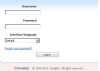
I am having this weird issue at the moment where i am getting an incorrect plesk panel screen (as per default 8443.jpg), and as you can see its showing 1999-2008. Its showing the correct version though. However if i log into the the machine via Remote Desktop and access it via localhost:8443, it shows the localhost.jpg picture which is the correct login screen. All the sites on my plesk i.e https://domain.com:8443 are redirecting to the "default 8443.jpg" which i cannot log into. Ive tried using the plesk panel reconfiguration services but that hasn't resolved anything.
Currently using
Plesk 10.1.1
Windows 2003 x64
Regards,
M
I am having this weird issue at the moment where i am getting an incorrect plesk panel screen (as per default 8443.jpg), and as you can see its showing 1999-2008. Its showing the correct version though. However if i log into the the machine via Remote Desktop and access it via localhost:8443, it shows the localhost.jpg picture which is the correct login screen. All the sites on my plesk i.e https://domain.com:8443 are redirecting to the "default 8443.jpg" which i cannot log into. Ive tried using the plesk panel reconfiguration services but that hasn't resolved anything.
Currently using
Plesk 10.1.1
Windows 2003 x64
Regards,
M