• Debian 11 is approaching its end-of-life (vendor EOL date - August 31, 2026). Plesk Obsidian 18.0.80 will be the last release to support it.
    If you are running Plesk Obsidian on Debian 11, we recommend you upgrade those servers to Debian 12 using our dist-upgrade tool.
  • We plan to deprecate and remove the support for XML RPC protocol versions earlier than 1.6.9.1 in Plesk Obsidian 18.0.82. We strongly recommend that you update all existing integrations using earlier versions of the XML RPC protocol to comply with the version 1.6.9.1 specification.

Resolved This IP address is not configured properly

Piekielko

Basic Pleskian
After today's auto update Plesk, my IPV6 address has stopped working.
Auto repair does not work.

This problem appeared to me for the second time. Earlier, it helped me remove this address from all domains and add it again.
Despite the error, the IPV6 address and domains are working properly.

Why is this repeated and how to fix it?
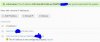
 

Attachments

  • Przechwytywanie.jpg
    Przechwytywanie.jpg
    32.7 KB · Views: 29
in the "IP_Addresses" (MySQL) I changed the entry in the "status" from "1" to "0".
All problems with this address have disappeared
 
No, not really. You should be able to ping the IPs.
i did but, i mean the result same below:

Request timed out.
Request timed out.
Request timed out.
Request timed out.

Ping statistics for 2a0x::xxxxxxx (my plesk IPv6)
Packets: Sent = 4, Received = 0, Lost = 4 (100% loss),
 
Have you added this IP to the Plesk?

Can you ping this IP from the SSH terminal of this server?
Yep i tried ssh terminal and it's unreachable

I added the IP via Plesk UI but the IP is not showing in the interface, if I go to any domain > Hosting & DNS > Hosting Setting > IP addresses, it's not there
 
Back
Top