Follow along with the video below to see how to install our site as a web app on your home screen.
Note: This feature may not be available in some browsers.
The APS Catalog has been deprecated and removed from all Plesk Obsidian versions. Applications already installed from the APS Catalog will continue working. However, Plesk will no longer provide support for APS applications.
Please be aware: with the Plesk Obsidian 18.0.78 release, the support for the ngx_pagespeed.so module will be deprecated and removed from the sw-nginx package.
Hey guys,
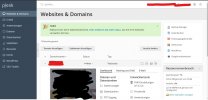
at first im sorry for my bad english. Im the admin of a webhosting account. At a lot of support documents i saw on the left site "tools and settings" but its not shown on me when i log in on example.com:8443. How you can see on she screenshot
Thanks for your Answer. Im not logged in with "Admin" but with the owner Account. Maybe i have to ask the domain provider for the admin account. Thanke you!
The admin account is only for those who are the owners of the server itself. From the initial post it says you're just an admin for a web hosting account so I'm guessing you are buying hosting space from a wet hosting company that is using plesk? Or do you actually own the whole server? Cause if you own the whole server, you should have an actual admin account that was created during the set up of the account. If you are just buying web hosting space then chances are you won't get admin access which means you won't get access to the tools & settings and instead all the things you do will be located under your domain.