
 Facebook
 Twitter
I am happy with the Plesk NodeJS extension, which works well on my system. However, the latest version Plesk currently supports is 7.4.0 and the latest NodeJS release at the time of writing is 8.1.3. So I tried to install this latest release (see steps below). But I cannot select the installed version from the NodeJS version selection dropdown. Does anybody know what steps I am missing?
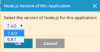
What I did:
Install NodeJS 8.x
Register NodeJS with Plesk
(as found in this thread Question - Possible to install node 4.x)
The output of the registered NodeJS versions:
System details:
- Plesk Onyx 17.5.3 Update #11
- Node.js extension 1.3.2-78
- Ubuntu 16.04.2 LTS
What I did:
Install NodeJS 8.x
Code:
curl -sL https://deb.nodesource.com/setup_8.x | sudo -E bash -
sudo apt-get install -y nodejs
Register NodeJS with Plesk
(as found in this thread Question - Possible to install node 4.x)
Code:
plesk sbin nodemng register /usr/bin/nodeThe output of the registered NodeJS versions:
Code:
root@myserver:~# plesk sbin nodemng versions
v8.1.2 /usr/bin/node
v6.9.1 /opt/plesk/node/6/bin/node
v7.4.0 /opt/plesk/node/7/bin/node
System details:
- Plesk Onyx 17.5.3 Update #11
- Node.js extension 1.3.2-78
- Ubuntu 16.04.2 LTS


