
 Facebook
 Twitter
TITLE:
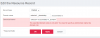 EXPECTED RESULT:
Unable to create an Office365 DKIM alias in Plesk
PRODUCT, VERSION, OPERATING SYSTEM, ARCHITECTURE:Plesk 17.5.3 / Ubuntu 16.0.4 LTS
PROBLEM DESCRIPTION:For a client with Office365 mail I want to enable DKIM.
For this I follow the procedure described here;
Use DKIM to validate outbound email sent from your custom domain in Office 365: Exchange Online Help
I need to create 2 CNAME pointing to a Microsoft record
This is not possible using the GUI it is possible to do it with CLI
STEPS TO REPRODUCE:For this I follow the procedure described here;
Use DKIM to validate outbound email sent from your custom domain in Office 365: Exchange Online Help
I need to create 2 CNAME pointing to a Microsoft record
This is not possible using the GUI it is possible to do it with CLI
Add this record using the GUI:
ACTUAL RESULT:
Code:
ACTION=add
DOMAIN=recyclevalley.nl
SUBDOMAIN=selector1._domainkey
TARGET=selector1-recyclevalley-nl._domainkey.recyclevalley.onmicrosoft.com

/usr/local/psa/bin/dns --${ACTION} ${DOMAIN} -cname ${SUBDOMAIN} -canonical ${TARGET}Accept the entry
ANY ADDITIONAL INFORMATION:I think it is testing for valid characters. I suspect it doesn't like the underscores. These should be valid as they are quite commonplace for these kind of records.
YOUR EXPECTATIONS FROM PLESK SERVICE TEAM:Confirm bug


