Facebook
 Twitter
- Server operating system version
- AlmaLinux 8.9 (Midnight Oncilla)
- Plesk version and microupdate number
- Plesk Obsidian v18.0.59_build1800240229.10 os_RedHat el8
Hi,
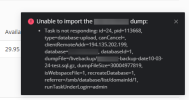
I am trying to import a large database dump. It fails after about 40%. The error message is:
There is enough disk storage (1TB). Nothing else is running on the server. Database version: 10.3.39-MariaDB.
Does anybody have an idea, what can cause the failure?
Thank you!
I am trying to import a large database dump. It fails after about 40%. The error message is:
Code:
Task is not responding: id=24, pid=113668, type=database-upload, canCancel=, clientRemoteAddr=194.135.202.199, database=xxx, databaseId=1, dumpFile=/my_path/xxx-backup-date10-03-24-test.sql.gz, dumpFileSize=30004977819, isWebspaceFile=1, recreateDatabase=1, referrer=/smb/database/list/domainId/1, runTaskUnderLogin=adminThere is enough disk storage (1TB). Nothing else is running on the server. Database version: 10.3.39-MariaDB.
Does anybody have an idea, what can cause the failure?
Thank you!