Facebook
 Twitter
Thomas Oryon
Regular Pleskian
- Server operating system version
- Redhat 9
- Plesk version and microupdate number
- 18.0.76
Hello
We need your advice on how to fix a PECL package installation issue in Plesk.
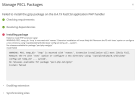
When we try to install the gzip package for PHP 8.4 from the Plesk panel, we receive a warning saying that /tmp is mounted with noexec, so the installation may fail.
+++
Failed to install PHP extension 'gzip':
WARNING: PECL temp_dir '/tmp' is mounted with 'noexec'. Extension installation will most likely fail. Remount the FS with 'exec' option or configure a new directory using '/opt/plesk/php/8.4/bin/pear config-set temp_dir ... system'.
No releases available for package "pecl.php.net/gzip"
install failed
+++
Our server is set this way for security, so we do not want to change /tmp to exec.
Could you please advise what is the best and recommended way to solve this in Plesk?
We would like to know:
We need your advice on how to fix a PECL package installation issue in Plesk.
When we try to install the gzip package for PHP 8.4 from the Plesk panel, we receive a warning saying that /tmp is mounted with noexec, so the installation may fail.
+++
Failed to install PHP extension 'gzip':
WARNING: PECL temp_dir '/tmp' is mounted with 'noexec'. Extension installation will most likely fail. Remount the FS with 'exec' option or configure a new directory using '/opt/plesk/php/8.4/bin/pear config-set temp_dir ... system'.
No releases available for package "pecl.php.net/gzip"
install failed
+++
Our server is set this way for security, so we do not want to change /tmp to exec.
Could you please advise what is the best and recommended way to solve this in Plesk?
We would like to know:
- Should we change the PECL temporary directory to another location instead of changing /tmp?
- Is there a proper Plesk-supported way to do this permanently?
- Will this affect future Plesk updates, PHP updates, or PECL extension installations?