• The APS Catalog has been deprecated and removed from all Plesk Obsidian versions.
    Applications already installed from the APS Catalog will continue working. However, Plesk will no longer provide support for APS applications.
  • Please be aware: with the Plesk Obsidian 18.0.78 release, the support for the ngx_pagespeed.so module will be deprecated and removed from the sw-nginx package.

Issue Unable to install extension for PHP

Thomas Oryon

Regular Pleskian
Server operating system version
Redhat 9
Plesk version and microupdate number
18.0.76
Hello

We need your advice on how to fix a PECL package installation issue in Plesk.

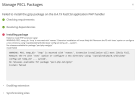
When we try to install the gzip package for PHP 8.4 from the Plesk panel, we receive a warning saying that /tmp is mounted with noexec, so the installation may fail.

+++
Failed to install PHP extension 'gzip':
WARNING: PECL temp_dir '/tmp' is mounted with 'noexec'. Extension installation will most likely fail. Remount the FS with 'exec' option or configure a new directory using '/opt/plesk/php/8.4/bin/pear config-set temp_dir ... system'.
No releases available for package "pecl.php.net/gzip"
install failed
+++

Our server is set this way for security, so we do not want to change /tmp to exec.

Could you please advise what is the best and recommended way to solve this in Plesk?

We would like to know:
  1. Should we change the PECL temporary directory to another location instead of changing /tmp?
  2. Is there a proper Plesk-supported way to do this permanently?
  3. Will this affect future Plesk updates, PHP updates, or PECL extension installations?
Please advise the safest and simplest method recommended by Plesk.
 

Attachments

  • Screenshot 2026-03-20 123749.png
    Screenshot 2026-03-20 123749.png
    62.3 KB · Views: 8
What is the output of:
Bash:
mount | grep /tmp

Looks like you have /tmp as a mount with noexec param.

You can manually install the extension or remount /tmp without noexec.
 
You can try the following:
Bash:
mount -o remount,rw,nosuid,nodev,raltime,attr2,inode64,logbufs=8,logbsize=32k,noquota /dev/mapper/vg_system-lv_tmp /tmp

If that doesn't work, because you have running services actually using /tmp, you can have a look in /etc/fstab and remove noexec from the /tmp mount. Then restart the server.
 
Hello Raul,

As we mentioned above, we can't change the FSTAB entry for /tmp. Since it is the shared hosting server, we need any other alternative to resolve this issue. Can you check and let us know?

Awaiting your reply.
 
Hi Thomas,

In that case, you will need to manually install the PHP extension after changing the temp_dir:

Bash:
dnf install plesk-php84-devel make gcc cpp <other dependencies>
export PATH=/opt/plesk/php/8.4/bin:$PATH

php -v

pear config-set  temp_dir /var/tmp
pecl install <package>

However, I just noticed that there is no gzip package on pecl.php.net. What are you trying to achieve?
 
Hello Raul,

Thanks for the update. Could you please share the exact step-by-step procedure to manually install the ionCube extension for the following Plesk PHP versions?
  • PHP 8.1
  • PHP 8.2
  • PHP 8.3
Can you share the steps with temp_dir setup to install the ioncube?

Awaiting your reply
 
You can't install ioncube_loader with pecl on PHP 8.1, 8.2 and 8.3. I also recommend not using PHP 8.1 since it's already EOL.

Download the loader archive from here: ionCube Loader - A website add-on for running ionCube encoded files, deploy the .so files, load them and reload the PHP-FPM and Apache services:
Bash:
cd ~
wget https://downloads.ioncube.com/loader_downloads/ioncube_loaders_lin_x86-64.zip -O ioncube_loaders_lin_x86-64.zip
unzip ioncube_loaders_lin_x86-64.zip
cd ioncube
for version in $(echo "8.1 8.2 8.3"); do echo ${version}; /usr/bin/cp -vf ioncube_loader_lin_${version}.so /opt/plesk/php/${version}/lib64/php/modules/; echo "zend_extension=ioncube_loader_lin_${version}.so" > /opt/plesk/php/${version}/etc/php.d/00-ioncube-loader.ini; systemctl reload plesk-php8*fpm.service httpd;  done;

# stop here
# the same as above, but in a more readable format
# for version in $(echo "8.1 8.2 8.3"); do
#    echo ${version};
#    /usr/bin/cp -vf ioncube_loader_lin_${version}.so /opt/plesk/php/${version}/lib64/php/modules/;
#    echo "zend_extension=ioncube_loader_lin_${version}.so" > /opt/plesk/php/${version}/etc/php.d/00-ioncube-loader.ini;
#    systemctl reload plesk-php8*fpm.service httpd
# done;
 
Hello Raul,

Thanks for the update. Can you let us know the steps to install memcached from PECL in Plesk?

Can you share the steps with temp_dir setup to install the memcached?

Awaiting your reply
 
Hi,

You can use the following commands:
Bash:
#install dependencies
dnf install libmemcached-devel.x86_64 plesk-php84-devel plesk-php83-devel plesk-php82-devel make gcc cpp
# set the custom temp folder
pear config-set  temp_dir /var/tmp

# compile and install for PHP  8.4
export PATH=/opt/plesk/php/8.4/bin:$PATH
pecl install memcached
# enter on all prompts, until the extension is compiled
phpinid=$(php -i | awk '/Scan this dir for additional .ini files/ {print $NF}')
echo "extension=memcached.so" > ${phpinid}/memcached.ini

# compile and install for PHP  8.3
export PATH=/opt/plesk/php/8.3/bin:$PATH
pecl install memcached
# enter on all prompts, until the extension is compiled
phpinid=$(php -i | awk '/Scan this dir for additional .ini files/ {print $NF}')
echo "extension=memcached.so" > ${phpinid}/memcached.ini

# compile and install for PHP  8.2
export PATH=/opt/plesk/php/8.2/bin:$PATH
pecl install memcached
# enter on all prompts, until the extension is compiled
phpinid=$(php -i | awk '/Scan this dir for additional .ini files/ {print $NF}')
echo "extension=memcached.so" > ${phpinid}/memcached.ini

# reload all PHP-FPM services and Apache 
systemctl reload plesk-php8*fpm.service httpd
 
Hello Raul,

Thanks for the update. FYI, we have not allowed the external URL to download the pacakges from PECL to install in our server. Can you share the Steps to download the file manually and install in the server?

Also, we are using Litespeed webserver and we are using FastCGI handlers in our plesk server.

Please share the details based on the above requirement.

Awaiting your reply.
 
Back
Top
