• We value your experience with Plesk during 2025
    Plesk strives to perform even better in 2026. To help us improve further, please answer a few questions about your experience with Plesk Obsidian 2025.
    Please take this short survey:

    https://survey.webpros.com/

Unable to login as "admin"

C

C.F

Guest
Hi.
i just upgraded 10.2.0 to 10.3.0 on my Debian 6 (i686) yesterday.

now i'm not able to login as admin no more.
after entering login credentials the site returns to login-window.


any ideas?
 
thanks for your reply...but unfortunately this is not the solution for me.
i know the admin password and i also know where to look for it.

i just don't understand why the login process can not be completed...
only for the admin user.

i only can login as a configured clientuser or webmail account...but not as admin

now i changed a value in the psa DB
in psa.cl_param i found an entry for clientID 2 (which is admin in my installation) with "OveruseBlock" set to true. ich changed it to "false"

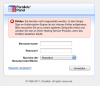
now after entering the correct credentials i get an error response.
 

Attachments

  • Bildschirmfoto 2011-07-15 um 10.19.47.png
    Bildschirmfoto 2011-07-15 um 10.19.47.png
    46.8 KB · Views: 13
Last edited by a moderator:
yes i did as your link showed me...

/usr/local/psa/bin/init_conf --set-admin-password -passwd NEW_PASSWORD
 
we had the same trouble and after day of trying to fix it (believe me, we have tried everything) we just reinstalled plesk 10.2 on a new server and updated it to 10.3.
Now admin can log in, but CMB is not working anymore.
 
if you do cat /etc/psa/.psa.shadow and try and login with that pw does it work?

also make sure that your password doesnt have a # sign in it - Ive had troubles with that in the past.
 
/etc/psa/.psa.shadow exists...containing the password i already know.
no typo or unsupported chars here....

i need to be able to log in


is it possible to downgrade?
 
there is nothing i can see inside of the error_log so i checked /opt/psa/admin/logs/httpsd_access_log

[18/Jul/2011:11:38:07 +0200] "POST /sso/ui HTTP/1.1" 200 6138 "https://sauron.bmradio.de:8443/relay" "Mozilla/5.0 (Macintosh; Intel Mac OS X 10.6; rv:5.0.1) Gecko/20100101 Firefox/5.0.1"
[18/Jul/2011:11:39:03 +0200] "POST /plesk
[18/Jul/2011:11:39:03 +0200] "POST /relay HTTP/1.1" 200 4091 "https://sauron.bmradio.de:8443/sso/ui" "Mozilla/5.0 (Macintosh; Intel Mac OS X 10.6; rv:5.0.1) Gecko/20100101 Firefox/5.0.1"
[18/Jul/2011:11:39:03 +0200] "POST /login_up.php3?window_id=&requested_url=https%3A%2F%2Fsauron.bmradio.de%3A8443%2F HTTP/1.1" 200 2601 "https://sauron.bmradio.de:8443/relay" "Mozilla/5.0 (Macintosh; Intel Mac OS X 10.6; rv:5.0.1) Gecko/20100101 Firefox/5.0.1"
[18/Jul/2011:11:39:03 +0200] "POST /relay HTTP/1.1" 200 1904 "https://sauron.bmradio.de:8443/login_up.php3?window_id=&requested_url=https%3A%2F%2Fsauron.bmradio.de%3A8443%2F" "Mozilla/5.0 (Macintosh; Intel Mac OS X 10.6; rv:5.0.1) Gecko/20100101 Firefox/5.0.1"
 
well now that is kinda weird...

i disabled sso and ran a psa stopall ; psa startall...now i can login as admin again...

is that a new feature or a bug?
 
ok last question...

if i proceed like in http://kb.odin.com/en/9327 described...

by uninstalling sw-sso & plesk-billing

will plesk still be working or will that step completely mess up everything?

sorry but i can't risk to blow up the whole house. i just want to be able to use the software that we bought correctly
 
I've never actually used sso and plesk billing nor installed it - so I wouldnt worry about it breaking plesk as those are add on components taht it doesnt need to function but is there to add or extend functionality.
 
ok. now after i uninstalled sw-sso and plesk-billing package
how do i remove those business related features from the admin panel?
 
I would imagine that if you remove/uninstall them they would go away automatically

i was hoping so..but i wouldn't ask if this had happened...

do i have to uninstall it in the plesk panel as well?

i just used "aptitude purge" to remove sw-sso, plesk-billing and plesk-billing-plugins

but if i login into plesk panel i still see plesk-billing related links in the navigation bar
 
http://kb.odin.com/en/9327

The last step will remove CBM -related links in Panel left menu:
"Note: Create a backup of the Plesk database before performing the changing described below with the following command:
mysqldump -uadmin -p`cat /etc/psa/.psa.shadow` psa > /root/psa.dump.sql

Login to the psa database as it is described in the article, How can I access MySQL databases in Plesk?, and remove the record with the following SQL query:
delete from cl_param where param='ppb-url';"
 
Back
Top