
 Facebook
 Twitter
- Server operating system version
- Debian 10.13
- Plesk version and microupdate number
- Obsidian v18.0.56_build1800231006.13
Hi all,
I've recently migrated my server to another provider and need to give chrooted access to one of my subscriptions, mainly for use with VSCode. I have full root access to my server and can connect via SSH, but I am unable to allow chrooted access (or actually any other type of access) to a subscription within Plesk Management Interface as it keeps defaulting to 'Forbidden'. I'm connected as Plesk Admin and not in Restricted Mode.
I'm not sure if it's to do with the UI updates on Obsidian (as pages now open as a left windowed tab and without any 'Save/Update' button for any modifications, instead of the actual page - if that makes sense? Please see image) or if it's something else? Maybe there is a file I can edit to give a subscription the access I need, or a command that I can run within the terminal?
Any help would be greatly appreciated.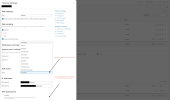
I've recently migrated my server to another provider and need to give chrooted access to one of my subscriptions, mainly for use with VSCode. I have full root access to my server and can connect via SSH, but I am unable to allow chrooted access (or actually any other type of access) to a subscription within Plesk Management Interface as it keeps defaulting to 'Forbidden'. I'm connected as Plesk Admin and not in Restricted Mode.
I'm not sure if it's to do with the UI updates on Obsidian (as pages now open as a left windowed tab and without any 'Save/Update' button for any modifications, instead of the actual page - if that makes sense? Please see image) or if it's something else? Maybe there is a file I can edit to give a subscription the access I need, or a command that I can run within the terminal?
Any help would be greatly appreciated.


