• Debian 11 is approaching its end-of-life (vendor EOL date - August 31, 2026). Plesk Obsidian 18.0.80 will be the last release to support it.
    If you are running Plesk Obsidian on Debian 11, we recommend you upgrade those servers to Debian 12 using our dist-upgrade tool.
  • We plan to deprecate and remove the support for XML RPC protocol versions earlier than 1.6.9.1 in Plesk Obsidian 18.0.82. We strongly recommend that you update all existing integrations using earlier versions of the XML RPC protocol to comply with the version 1.6.9.1 specification.

Issue Unable to Remove or Edit Firewall Rules

APaterson71

New Pleskian
I have set up a firewall rule to block a particular number of IP addresses, and wanted to add a few more ranges. When I click on the rule all I can do is view it, I cannot add anything to the list. Also on the list of rules the tick box next to the rule is disabled so I cannot remove it (rules that were set up by the system do have the tick boxes active)

Any ideas as to what may be wrong?
Thanks
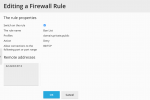
Screen Shot 2020-12-16 at 11.49.49.png
 
possibly back up before

rm /opt/psa/var/modules/firewall/firewall-new.sh
rm /opt/psa/var/modules/firewall/safeact.confirm

and then apply and confirm only once at the end:
On first SSH:
/usr/local/psa/bin/modules/firewall/settings -a
On second SSH:
/usr/local/psa/bin/modules/firewall/settings -c
 
Back
Top