• Debian 11 is approaching its end-of-life (vendor EOL date - August 31, 2026). Plesk Obsidian 18.0.80 will be the last release to support it.
    If you are running Plesk Obsidian on Debian 11, we recommend you upgrade those servers to Debian 12 using our dist-upgrade tool.
  • We plan to deprecate and remove the support for XML RPC protocol versions earlier than 1.6.9.1 in Plesk Obsidian 18.0.82. We strongly recommend that you update all existing integrations using earlier versions of the XML RPC protocol to comply with the version 1.6.9.1 specification.

Resolved Uninstall PHP from OS vendor

marowi

New Pleskian
Hello,

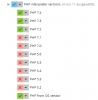
I am running Plesk Obsidian 18.0.30 and would like to know if I can uninstall PHP from OS vendor? This is 7.0.33 and outdated.
1600953410276.png

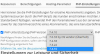
All websites on our server run PHP 7.4, so I don't really need the outdated OS vendor version.
1600953614481.png

But I want to make sure that it does not cause any problems when I uninstall it.

The only post I found about this is a bit older:

Best regards
Manuel
 
It worked without any problems. :)

Plesk now feels a bit faster too. But maybe it's just coincidence.
 
After uninstalling PHP from OS vendor (7.0.33) and PHP 7.2.33, I now get the following error message every hour by mail:

run-parts: /etc/cron.hourly/plesk-php-cleanuper exited with return code 1
 
After uninstalling PHP from OS vendor (7.0.33) and PHP 7.2.33, I now get the following error message every hour by mail:
The cron script failed to execute becase the /var/lib/php/sessions directory is missing
Create the missing /var/lib/php and /var/lib/php/sessions directories:

# mkdir /var/lib/php
# mkdir /var/lib/php/sessions

Set the correct permissions for these directories:

# chmod 755 /var/lib/php
# chmod 1733 /var/lib/php/sessions

Execute the /etc/cron.hourly/plesk-php-cleanuper task to make sure it runs correctly. Exit code 0 means that the execution was successful:

# sh -x /etc/cron.hourly/plesk-php-cleanuper
+ '[' -e /etc/cron.d/php -a -x /usr/lib/php/sessionclean ']'
+ pgrep -f '.*/etc/cron.hourly/plesk-php-cleanuper$'
+ grep -qv 30892
+ renice 19 -p 30892
+ '[' -x /usr/lib/plesk-9.0/maxlifetime ']'
+ '[' -d /var/lib/php/sessions ']'
++ /usr/lib/plesk-9.0/maxlifetime
+ /usr/lib/plesk-9.0/php_session_cleaner /var/lib/php/sessions 24

# echo $?
0
 
Back
Top