• Debian 11 is approaching its end-of-life (vendor EOL date - August 31, 2026). Plesk Obsidian 18.0.80 will be the last release to support it.
    If you are running Plesk Obsidian on Debian 11, we recommend you upgrade those servers to Debian 12 using our dist-upgrade tool.
  • We plan to deprecate and remove the support for XML RPC protocol versions earlier than 1.6.9.1 in Plesk Obsidian 18.0.82. We strongly recommend that you update all existing integrations using earlier versions of the XML RPC protocol to comply with the version 1.6.9.1 specification.

Resolved Update does not stop

CobraArbok

Regular Pleskian
If I install components from Tools & Settings / Updates and Upgrades, at the end in the window I see All patches were applied, but at the top right the bar is often incomplete, on the left the wheel continues to turn and there is no button to confirm that the work is finished.
Even after many minutes the situation does not change.
Can I close the window and launch a new installation?
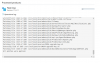
Plesk-Updating.png
 
How can I install the individual modules from the command line?

===== Update

I found it !
plesk installer
 
Last edited:
Back
Top