• The new Python extension is now available. It allows customers to deploy and manage WSGI-based Python applications on their websites directly from Plesk.
  • The Plesk Mobile apps for iOS and Android and the Plesk Mobile Center extension have been deprecated, and are no longer available for new installations. In Plesk Obsidian 18.0.84, the Plesk Mobile Center extension will be removed from servers during the upgrade, and the Plesk Mobile apps will lose their server management features.
  • The Social Login extension has been deprecated and will be removed in Plesk Obsidian 18.0.84. After that, it will no longer be possible to log in to Plesk with a Google, Facebook, GitHub account, or with a passkey. Plesk usernames and passwords, as well as logging in with a WebPros Account, are not affected.

Resolved User can not change password in roundcube

boosterfan

Basic Pleskian
Hey guys,

does anyone have installation instructions what to do, so that the users can change the password in roundcube?

Thanks a lot so far.


Greets

Tobias
 
Hi boosterfan,

what issues/errors/problems do you experience and most important, what does the corresponding log - file logs, when you try to change the password in roundcube?


In addition, pls. include at least the output of
Code:
plesk version
( logged in as user "root" over SSH ), in your threads, because it helps people willing to help you to reproduce ( possible ) bugs, errors, issues and problems on the very same environment and helps as well to suggest solutions / work-arounds, based on your environment. ;)
 
We do not get any issues, the users just do not have any option to change the password, when they are logged in ??

We use latest plesk onyx 17.5 and roundcube, installed / updated with plesk updater/installer.
 
Hi boosterfan,

the users just do not have any option to change the password, when they are logged in ??
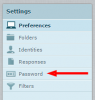
You mean, you don't have the options at "Settings > Password"

Plesk-Onyx_Roundcube_Settings_001.png

Plesk-Onyx_Roundcube_Settings_Password_001.png

Plesk-Onyx_Roundcube_Settings_Password_002.png

IF you MISS these options, pls. check, that the configuration file looks like this example:

=> /usr/share/psa-roundcube/config/defaults.inc.php

Code:
...

// ----------------------------------
// PLUGINS
// ----------------------------------

// List of active plugins (in plugins/ directory)
$config['plugins'] = array('password', 'markasjunk2', 'sieverules');

...


We use latest plesk onyx 17.5 and roundcube, installed / updated with plesk updater/installer.
On WHICH operating system, pls. ?
 
Last edited by a moderator:
Back
Top