Follow along with the video below to see how to install our site as a web app on your home screen.
Note: This feature may not be available in some browsers.
We value your experience with Plesk during 2025 Plesk strives to perform even better in 2026. To help us improve further, please answer a few questions about your experience with Plesk Obsidian 2025. Please take this short survey: https://survey.webpros.com/
On Plesk for Linux mod_status is disabled on upgrades to improve Apache security. This is a one-time operation that occurs during an upgrade. You can manually enable mod_status later if needed.
Hi
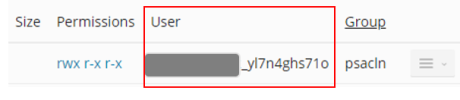
Is it possible to change the username plesk assigns to the admin plesk user during the first account activation as shown below?
The long and random nature of the User name in Linux file system is likely create problems further down the line.
Many thanks
When you create a subscription, the user name can be freely edited. You may need to open one of the optional drawers/fly-outs at the bottom of the subscription-creation-dialogue.
The user name can also be changed by the "admin" afterwards. Best practice is to
1) suspend the subscription (this is needed to keep running processes from blocking a user name change)
2) enter the "webhosting settings" dialogue page and change the user name.
3) enable the subscription again.