• Debian 11 is approaching its end-of-life (vendor EOL date - August 31, 2026). Plesk Obsidian 18.0.80 will be the last release to support it.
    If you are running Plesk Obsidian on Debian 11, we recommend you upgrade those servers to Debian 12 using our dist-upgrade tool.
  • We plan to deprecate and remove the support for XML RPC protocol versions earlier than 1.6.9.1 in Plesk Obsidian 18.0.82. We strongly recommend that you update all existing integrations using earlier versions of the XML RPC protocol to comply with the version 1.6.9.1 specification.

Issue username and file permissions

Ayki

Basic Pleskian
Hi
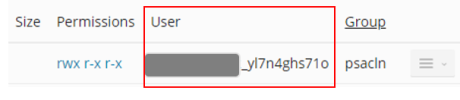
Is it possible to change the username plesk assigns to the admin plesk user during the first account activation as shown below?
1644427762588.png
The long and random nature of the User name in Linux file system is likely create problems further down the line.
Many thanks
 
When you create a subscription, the user name can be freely edited. You may need to open one of the optional drawers/fly-outs at the bottom of the subscription-creation-dialogue.

The user name can also be changed by the "admin" afterwards. Best practice is to
1) suspend the subscription (this is needed to keep running processes from blocking a user name change)
2) enter the "webhosting settings" dialogue page and change the user name.
3) enable the subscription again.
 
Back
Top