
 Facebook
 Twitter
Paul Creedy
Basic Pleskian
I'm still finding my feet with Plesk and see in the documentation that there is a website import feature
Website Migration
However I'm unable to find said feature?
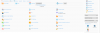
If I go to websites and domains, scroll down to the domain (any domain), the website importing link specified in the instructions is not there.
I've attached a screenshot of a domains section.
Plesk version: Version Plesk Onyx v17.5.3_build1705170317.16 os_Ubuntu 16.04
I've enabled the Plesk migration component, but this appears to refer to importing it via FTP not the Plesk migrator.
Website Migration
However I'm unable to find said feature?
If I go to websites and domains, scroll down to the domain (any domain), the website importing link specified in the instructions is not there.
I've attached a screenshot of a domains section.
Plesk version: Version Plesk Onyx v17.5.3_build1705170317.16 os_Ubuntu 16.04
I've enabled the Plesk migration component, but this appears to refer to importing it via FTP not the Plesk migrator.
Attachments
Last edited:


