
 Facebook
 Twitter
You are seeing the "Not secure" warning because 82.165.98.82 is not a domain name in the installed certificate. The certificate is also expired.
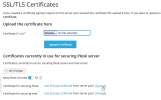
You can change the expired certificate or issue a new one, from Tools & Settings > Security: SSL/TLS Certificates > Let's Encrypt. In your case, https://82.165.98.82/admin/ssl-certificate/list
You are accessing Plesk via the webserver, without specifying port 8443. This is possible only when accessing the IP (and you don't have a default website) or using a domain name that is not added in Plesk as a website.
You can issue a new Let's Encrypt certificate or use an existing SSL certificate, then access Plesk using https://domain_covered_by_ssl_certificate:8443. You won't see any certificate warnings in this case.
You can change the expired certificate or issue a new one, from Tools & Settings > Security: SSL/TLS Certificates > Let's Encrypt. In your case, https://82.165.98.82/admin/ssl-certificate/list
You are accessing Plesk via the webserver, without specifying port 8443. This is possible only when accessing the IP (and you don't have a default website) or using a domain name that is not added in Plesk as a website.
You can issue a new Let's Encrypt certificate or use an existing SSL certificate, then access Plesk using https://domain_covered_by_ssl_certificate:8443. You won't see any certificate warnings in this case.