• Halloween is coming! To celebrate the occasion, we dusted off a couple of old skins, and even created a brand new one (Pixel).
    To get into the festive spirit, install the Skins extension.
  • The new Python extension is now available. It allows customers to deploy and manage WSGI-based Python applications on their websites directly from Plesk.
  • The Plesk Mobile apps for iOS and Android and the Plesk Mobile Center extension have been deprecated, and are no longer available for new installations. In Plesk Obsidian 18.0.84, the Plesk Mobile Center extension will be removed from servers during the upgrade, and the Plesk Mobile apps will lose their server management features.
  • The Social Login extension has been deprecated and will be removed in Plesk Obsidian 18.0.84. After that, it will no longer be possible to log in to Plesk with a Google, Facebook, GitHub account, or with a passkey. Plesk usernames and passwords, as well as logging in with a WebPros Account, are not affected.

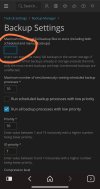
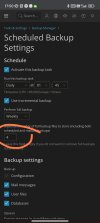
Question What difference in max number full backups? In two places

dariusju

Basic Pleskian
Server operating system version
Ubuntu
Plesk version and microupdate number
Latest
Do they differ?
Screenshot_2023-10-07-17-49-35-746_com.vivaldi.browser-edit.jpgScreenshot_2023-10-07-17-50-17-017_com.vivaldi.browser-edit.jpg
 
Based on the screenshots, I get that this is not very clear. If you fill in a number on the backup settings screen, the corresponding text on the scheduled backup settings screen will clarify how this works.

But, to answer your question:
- Number of full backups on the backup settings screen: the maximum number of full backups that can be stored on the backup location (doesn't have to be the server itself)
- Number of full backups on the scheduled backup settings screen: the number of full backups you want to use. This can equal or lower than the number you entered on the backup settings screen.

i.e.:
If the maximum number of full backups on the backup settings screen is 4, the number of full backups on the scheduled backup settings screen should be 4 or less.
 
Based on the screenshots, I get that this is not very clear. If you fill in a number on the backup settings screen, the corresponding text on the scheduled backup settings screen will clarify how this works.

But, to answer your question:
- Number of full backups on the backup settings screen: the maximum number of full backups that can be stored on the backup location (doesn't have to be the server itself)
- Number of full backups on the scheduled backup settings screen: the number of full backups you want to use. This can equal or lower than the number you entered on the backup settings screen.

i.e.:
If the maximum number of full backups on the backup settings screen is 4, the number of full backups on the scheduled backup settings screen should be 4 or less.
So better to leave it blank and control count with scheduling. If I have 20 websites and growing it's hard to count how much total backups I need. it's 80 or more . Right?
 
I wouldn't leave it blank. You better set a maximum number of full backups, depending on the amount of expected disk usage of the backups in the future, to prevent you from running out of disk space.
Next, decide how many of the maximum number of full backups you really want to use in the scheduled backup settings.

I suggest starting with a maximum of 4 full backups and see how that works for you.
 
Back
Top