
 Facebook
 Twitter
pleskuser67553
Regular Pleskian
- Server operating system version
- AlmaLinux 9.8 (Olive Jaguar)
- Plesk version and microupdate number
- Plesk Obsidian 18.0.80 Update #7
I have a WordPress site with a critically vulnerable Theme (as high as 9.9 CVSS on Patchstack). This Theme, like most themes that have been customised, has a Child Theme. The Child Theme is the Active Theme.
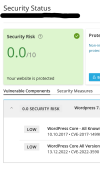
Although it sends out emails to say that the Parent Theme is vulnerable (but only with the latest vulnerability, not a list of all vulnerabilities affecting that version), WP Toolkit does not show the vulnerable Parent Theme in the list of Vulnerable Components tab on the Security Status flyout panel in the UI.
The only clue in the UI that the Parent Theme is vulnerable is in the Themes tab of the WordPress domain card showing, and clicking on that does not give any information about how vulnerable it is, only to say "This theme contains known vulnerabilities. Activating it can compromise your website's security" - An inexperienced user might assume that's okay because it's not active, but the active Child Theme depends on the "inactive" Parent Theme.

Could it be that the Child Theme configured incorrectly, or is this a bug in WP Toolkit, which should, in my opinion, always refer to the inactive Parent Theme when its Child Theme is active.
Although it sends out emails to say that the Parent Theme is vulnerable (but only with the latest vulnerability, not a list of all vulnerabilities affecting that version), WP Toolkit does not show the vulnerable Parent Theme in the list of Vulnerable Components tab on the Security Status flyout panel in the UI.
The only clue in the UI that the Parent Theme is vulnerable is in the Themes tab of the WordPress domain card showing, and clicking on that does not give any information about how vulnerable it is, only to say "This theme contains known vulnerabilities. Activating it can compromise your website's security" - An inexperienced user might assume that's okay because it's not active, but the active Child Theme depends on the "inactive" Parent Theme.
Could it be that the Child Theme configured incorrectly, or is this a bug in WP Toolkit, which should, in my opinion, always refer to the inactive Parent Theme when its Child Theme is active.


