caygri New Pleskian Jun 10, 2020 #1 Hello, in Plesk Obsidian I dont found anymore Copy Website features. Where is it?
IgorG Plesk addicted! Plesk Certified Professional Jun 10, 2020 #2 Website Copying Working with a Staging Site If you have a production website and are planning major site changes, consider setting up a staging site — a separate... docs.plesk.com
Website Copying Working with a Staging Site If you have a production website and are planning major site changes, consider setting up a staging site — a separate... docs.plesk.com
caygri New Pleskian Jun 10, 2020 #3 i know very well how to..but in obsidian interface missin "copy website" I see only if I change view
IgorG Plesk addicted! Plesk Certified Professional Jun 10, 2020 #4 Make sure that permission "Access to advanced operations: Website Copying" is enabled for your subscription.
Make sure that permission "Access to advanced operations: Website Copying" is enabled for your subscription.
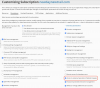
IgorG Plesk addicted! Plesk Certified Professional Jun 10, 2020 #6 Check subscription's permission settings.
M marvydery New Pleskian Jun 13, 2020 #8 IgorG said: View attachment 17057 Check subscription's permission settings. Click to expand... I have enabled this option but I can't still see website copying. Please help me
IgorG said: View attachment 17057 Check subscription's permission settings. Click to expand... I have enabled this option but I can't still see website copying. Please help me
Anthony Administrator Staff member Jun 14, 2020 #10 If you are using the Dynamic list, the Website Copy option is disabled by default for this view. You can this feature back by adding the following param in the panel.ini configuration file (use Panel.ini Editor extension): [dynamicList] enableFeatures = sitecopy
If you are using the Dynamic list, the Website Copy option is disabled by default for this view. You can this feature back by adding the following param in the panel.ini configuration file (use Panel.ini Editor extension): [dynamicList] enableFeatures = sitecopy