• The new Python extension is now available. It allows customers to deploy and manage WSGI-based Python applications on their websites directly from Plesk.
  • The Plesk Mobile apps for iOS and Android and the Plesk Mobile Center extension have been deprecated, and are no longer available for new installations. In Plesk Obsidian 18.0.84, the Plesk Mobile Center extension will be removed from servers during the upgrade, and the Plesk Mobile apps will lose their server management features.
  • The Social Login extension has been deprecated and will be removed in Plesk Obsidian 18.0.84. After that, it will no longer be possible to log in to Plesk with a Google, Facebook, GitHub account, or with a passkey. Plesk usernames and passwords, as well as logging in with a WebPros Account, are not affected.

WordPress security check fail

bulent

Regular Pleskian
Hello,
for some reason wordpress toolkit can not apply permissions for files and directories for some of the wordpress installs.
It's not somthing new, can be fixed only if I run
Code:
chmod -R a=r,a+X,u+w    /var/www/vhosts/example.com/httpdocs/
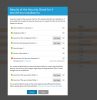
from the command line
 

Attachments

  • 2015-12-14.png
    2015-12-14.png
    65.6 KB · Views: 19
@IgorG,

This issue is very likely to be related to the issue(s) involving WPT not recognizing WP instances in specific circumstances.

If you do not mind, I will start a conversation, can you invite one (or more) members from the "WPT development team" to that conversation?

Regards...
 
Back
Top