
 Facebook
 Twitter
Giu
Basic Pleskian
- Server operating system version
- Debian 12.4
- Plesk version and microupdate number
- 18.0.58
Hi Forum,
When a User deactivates a Plugin inside WP-Admin. This change of status in: /v1/installations/{installationId}/plugins route will not be reflected in the api response.
The response property "status" shows then still true.
only if you go into Plesk Admin navigate to the Installation in WP Toolkit and press this refresh button the status of the Plugins gets updated:
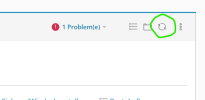
After clicking this refresh button the changes of Plugin activation Status gets reflected in API and Plesk WP Toolkit View.
my question now is: how can i trigger this refresh button with the API or Plesk CLI, since the api route /v1/installations/{installationId}/plugins is useless if its not showing the actual data about the plugins of the wp installation.
When a User deactivates a Plugin inside WP-Admin. This change of status in: /v1/installations/{installationId}/plugins route will not be reflected in the api response.
The response property "status" shows then still true.
only if you go into Plesk Admin navigate to the Installation in WP Toolkit and press this refresh button the status of the Plugins gets updated:
After clicking this refresh button the changes of Plugin activation Status gets reflected in API and Plesk WP Toolkit View.
my question now is: how can i trigger this refresh button with the API or Plesk CLI, since the api route /v1/installations/{installationId}/plugins is useless if its not showing the actual data about the plugins of the wp installation.


