• The new Python extension is now available. It allows customers to deploy and manage WSGI-based Python applications on their websites directly from Plesk.
  • The Plesk Mobile apps for iOS and Android and the Plesk Mobile Center extension have been deprecated, and are no longer available for new installations. In Plesk Obsidian 18.0.84, the Plesk Mobile Center extension will be removed from servers during the upgrade, and the Plesk Mobile apps will lose their server management features.
  • The Social Login extension has been deprecated and will be removed in Plesk Obsidian 18.0.84. After that, it will no longer be possible to log in to Plesk with a Google, Facebook, GitHub account, or with a passkey. Plesk usernames and passwords, as well as logging in with a WebPros Account, are not affected.

Issue WP Toolkit, unable to log in to Wordpress Backend (500 Header Values must me RFC 7230 compatible strings)

fpanzer

New Pleskian
Server operating system version
Ubuntu 24.04
Plesk version and microupdate number
Plesk Obsidian 18.0.77 Update 4 Web Host Edition
When using the login button for a wp-toolkit enabled Wordpress Instance

i get a new tab where it says
"Anmeldeinformationen des WordPress-Administrators werden abgerufen. Bitte warten...", then after a few seconds i get

{"meta":{"status":500,"message":"Interner Serverfehler: Header values must be RFC 7230 compatible strings"}}

Plugins, Themes etc. can be retreived from the wordpress instance without any problem.
Directly logging in to domain.tld/wp-admin works.

Any advice, anyone?
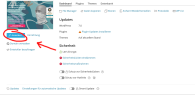
 

Attachments

  • Bildschirmfoto vom 2026-06-02 12-14-41.png
    Bildschirmfoto vom 2026-06-02 12-14-41.png
    204.2 KB · Views: 10
@Francesco Dalla M , could you please confirm if WP-Toolkit is the latest version 6.11.0-10571 (Plesk panel > Extensions > My extensions)? If yes, please double-check what's being logged in /var/log/plesk/panel.log at the time of the error occurrence.
 
It might not be related to the WP Toolkit, but to a plugin or theme of the website. I've seen the symptom several times in customer installations that were using problematic plugins. Have you tried to login using the /wp-login.php page?
 
Back
Top