• Debian 11 is approaching its end-of-life (vendor EOL date - August 31, 2026). Plesk Obsidian 18.0.80 will be the last release to support it.
    If you are running Plesk Obsidian on Debian 11, we recommend you upgrade those servers to Debian 12 using our dist-upgrade tool.
  • We plan to deprecate and remove the support for XML RPC protocol versions earlier than 1.6.9.1 in Plesk Obsidian 18.0.82. We strongly recommend that you update all existing integrations using earlier versions of the XML RPC protocol to comply with the version 1.6.9.1 specification.

Issue You do not have permission to view this directory or page.

Feelblue

New Pleskian
I just install plesk at my server.

But after i add domain, website, i not able to access.
i had try few method .

1============
In Plesk 12.X
  1. Open up your Plesk Control Panel.
  2. On the Domains tab section click on [domainname.com] .
  3. Click on the Websites & Domains tab.
  4. Click on the File Manager Icon.
  5. Click Root Directory in the menu.
  6. Scroll over httpdocs and click the drop-down arrow
  7. Select Change Permissions

2============
"%plesk_cli%\repair.exe" --update-websites-anonymous-user
"%plesk_cli%\repair.exe" --regenerate-web-server-users-password
"%plesk_cli%\repair.exe" --synchronize-impersonation-storage


but remain same..
any other method to solved this..
 
Go to Inetpub > vhosts > example.com > httpdocs > right-click and select Security > Edit > add IWPG_<ftpusername> then Apply
 
Enable Read access in IIS:

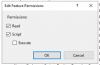
Go to IIS > Handler mappings (server-wide) and enable Read option

Contact Plesk Support Team if not help.
 
My step for install plesk until this step:
1. install plesk in windows server 2019.
2. do php setting, database setting.
3. add domain. then able to see this.
4. when click Open in web.
It show : You do not have permission to view this directory or page.
if click preview : it will show
HTTP Error 404.0 - Not Found,
The resource you are looking for has been removed, had its name changed, or is temporarily unavailable.


but i checked the physical path.. it do have all default document inside.

then i try install wordpress. when click login at administrator. it show same :
You do not have permission to view this directory or page.

i wonder is that i miss out any step

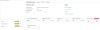
1590299570901.png

1590299771411.png
 
Thanks for quick response

Enable Read access in IIS:

Go to IIS > Handler mappings (server-wide) and enable Read option

Contact Plesk Support Team if not help.

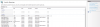
server-wide, when click Handler Mappings.. it show this..
hmm.. how to enable Read Option..?


1590299950603.png
 
Back
Top