Follow along with the video below to see how to install our site as a web app on your home screen.
Note: This feature may not be available in some browsers.
Debian 11 is approaching its end-of-life (vendor EOL date - August 31, 2026). Plesk Obsidian 18.0.80 will be the last release to support it.
If you are running Plesk Obsidian on Debian 11, we recommend you upgrade those servers to Debian 12 using our dist-upgrade tool.
We plan to deprecate and remove the support for XML RPC protocol versions earlier than 1.6.9.1 in Plesk Obsidian 18.0.82. We strongly recommend that you update all existing integrations using earlier versions of the XML RPC protocol to comply with the version 1.6.9.1 specification.
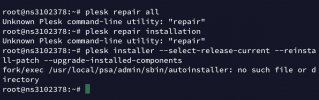
Hi, I accidentally removed curl from plesk and now my panel is not loading. Can someone please tell me how to re install curl for plesk so everything loads again? Thanks in advance
It looks like you have not only removed curl but a whole bunch of other things including a major part of Plesk. Unfortunately, this is beyond my knowledge horizon for remote support. I'd need to look into the machine in detail to figure out what has happened (which I don't offer). In this case I think it is best to contact Plesk support and open a ticket with them. In case you have purchased your licence from a reseller, this will help you:
Question How to get support directly from Plesk? Answer Lease-type Plesk licenses purchased directly from Plesk running on supported Plesk version include full free support. Perpetual-type license...

 Facebook
 Twitter