• Debian 11 is approaching its end-of-life (vendor EOL date - August 31, 2026). Plesk Obsidian 18.0.80 will be the last release to support it.
    If you are running Plesk Obsidian on Debian 11, we recommend you upgrade those servers to Debian 12 using our dist-upgrade tool.
  • We plan to deprecate and remove the support for XML RPC protocol versions earlier than 1.6.9.1 in Plesk Obsidian 18.0.82. We strongly recommend that you update all existing integrations using earlier versions of the XML RPC protocol to comply with the version 1.6.9.1 specification.

Question Add/remove component do not available

webstudio19

New Pleskian
Server operating system version
centos 7.9
Plesk version and microupdate number
18.0.47
hi

HI
I notice that the add/remove components area of plesk installer is not enabled
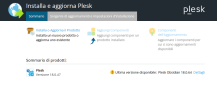
component.png
I should remove php5.4 and I don't understand how I can proceed!
thanks for the support
 
Hello!

Plesk 18.0.47 is very outdated and it was removed from download site, so that's why you cannot manage components. You can either remove unneeded packages via yum (less desired), or first update to latest version (18.0.64 at the time of writing), and then manage components via Plesk installer
 
You should be able to remove it by executing:

yum remove plesk-php54*

If that doesn't work, please run yum list installed | grep php to check the installed packages. Still, as mentioned by @mizar it is best to consider an update to the current version rather than manually removing components.
 
Back
Top