Facebook
 Twitter
Hi!
I have a very Big Problem and I need your help!
I have a Windows Server 2008 R2 running Plesk 11.0.9
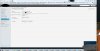
In Plesk i have added an IP Adress. I have typed it in, like it was requested:
87.106.12.XX/255.255.255.255
With clicking "OK" the panel froze, I lost my RDP connection and the server crashed!
When trying a reboot I get a bluescreen. I only have Access to the system with the 1and1 rescue-tool
Screenshot Plesk:

What went wrong?
Please help me to restore my server!
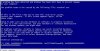
BLUESCREEN TEXT:
"A problem has been detected and Windows has been shut down to prevent damage
to your computer.
The problem seems to be caused by the following file: ntoskrnl.exe"
Greetings!
MiB
I have a very Big Problem and I need your help!
I have a Windows Server 2008 R2 running Plesk 11.0.9
In Plesk i have added an IP Adress. I have typed it in, like it was requested:
87.106.12.XX/255.255.255.255
With clicking "OK" the panel froze, I lost my RDP connection and the server crashed!
When trying a reboot I get a bluescreen. I only have Access to the system with the 1and1 rescue-tool
Screenshot Plesk:
What went wrong?
Please help me to restore my server!
BLUESCREEN TEXT:
"A problem has been detected and Windows has been shut down to prevent damage
to your computer.
The problem seems to be caused by the following file: ntoskrnl.exe"
Greetings!
MiB