
 Facebook
 Twitter
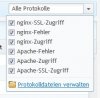
In one of our plesk server we are missing the apache error log in the "Logs of domain" GUI. We have no idea where to configure which logs are shown in the dropdown menu or why they are missing.

The error_log exists in the following directories (hardlinked):
-rw-rw-r-- 2 root root 10607972 Nov 29 16:56 /var/www/vhosts/system/domainname.com/logs/error_log
-rw-rw-r-- 2 root root 10607972 Nov 29 16:56 /var/www/vhosts/domainname.com/logs/error_log
Has anyone an idea what to do?
The error_log exists in the following directories (hardlinked):
-rw-rw-r-- 2 root root 10607972 Nov 29 16:56 /var/www/vhosts/system/domainname.com/logs/error_log
-rw-rw-r-- 2 root root 10607972 Nov 29 16:56 /var/www/vhosts/domainname.com/logs/error_log
Has anyone an idea what to do?


