• Debian 11 is approaching its end-of-life (vendor EOL date - August 31, 2026). Plesk Obsidian 18.0.80 will be the last release to support it.
    If you are running Plesk Obsidian on Debian 11, we recommend you upgrade those servers to Debian 12 using our dist-upgrade tool.
  • We plan to deprecate and remove the support for XML RPC protocol versions earlier than 1.6.9.1 in Plesk Obsidian 18.0.82. We strongly recommend that you update all existing integrations using earlier versions of the XML RPC protocol to comply with the version 1.6.9.1 specification.

Issue {WEBSPACEROOT} is the wrong directory. How do we fix this?

MHC_1

Regular Pleskian
Server operating system version
Alma Linux 9.7
Plesk version and microupdate number
Plesk obsidian 18.0.76#3
In the PHP Setting page on the Plesk domain account it shows the following:
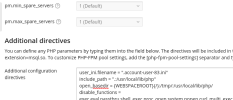
Screenshot from 2026-03-20 10-32-19.png

With open_basedir set as per Plesk Documentation: https://support.plesk.com/hc/en-us/...h-to-the-open-basedir-option-for-Plesk-domain

BUT the cronjob in this account dumps errors to the following location:

/var/www/vhosts/account-one.co.uk/error_log83.log

[20-Mar-2026 10:29:45 Europe/London] PHP Warning: error_log(): open_basedir restriction in effect. File(/var/www/vhosts/account-one.co.uk/error/cron_reports.txt) is not within the allowed path(s): (/var/www/vhosts/another-account.co.uk/:/tmp/:/usr/local/lib/php/) in /var/www/vhosts/account-one.co.uk/cronz/calProcessing.php on line 20

Screenshot from 2026-03-20 10-34-05.png


The CalProcessing.php file shows this:

Code:
$sdr = "/var/www/vhosts/account-one.co.uk/public_html";
$errorLog = "/var/www/vhosts/account-one.co.uk/error/cron_reports.txt";
require "class.dbxlink.inc.php";

error_log("error reported ok", 3, $errorLog); //line 20


How do we get Cron Jobs to correctly identify the specific account directory? Why doesn't {WEBSPACEROOT} as per the Plesk Documentation work?!

There is no commonality between account-one.co.uk and another-account.co.uk , they're not in the same subscription, not in the same owner. Nothing.
 
Unfortunately (and frustratingly) Plesk doesn't load the domain specific PHP configuration when executing Cron Jobs.

I posted a possible workaround for this scenario here.
 
Unfortunately (and frustratingly) Plesk doesn't load the domain specific PHP configuration when executing Cron Jobs.

I posted a possible workaround for this scenario here.

Ok, Thank you. I'll see what I can do with that, thank you @Kaspar .

However, I am still unclear how the cron job plesk runs specifically references another domain?!?! I've looked in the /etc/php.ini file which says:

Code:
open_basedir = /var/www/vhosts/account-one.co.uk/:tmp/:/usr/local/lib/php/

Which is correct.


Still very confused why PHP for the cronjob is referencing another account.
 
Where did you create the task? In the domain Schedule task page or in Tools & Settings? In Tools & Settings (/admin/scheduler/add-task) you also need to specify the correct system user.

How is the cron task configured? Run a command, Fetch a URL or Run a PHP script?
 
Where did you create the task? In the domain Schedule task page or in Tools & Settings? In Tools & Settings (/admin/scheduler/add-task) you also need to specify the correct system user.

How is the cron task configured? Run a command, Fetch a URL or Run a PHP script?

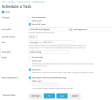
The task is set in the Domain Scheduled Tasks Scheduler. It is set as a "PHP Script" with the script and Cron job timing specified.
 

Attachments

  • Screenshot from 2026-03-20 15-36-08.png
    Screenshot from 2026-03-20 15-36-08.png
    86.2 KB · Views: 4
You'll have to choose the "Run a command" task type for the cron job, and call PHP to run your script that way. For example with the following command:
Code:
/opt/plesk/php/8.3/bin/php -c /var/www/vhosts/system/account-one.co.uk/etc/php.ini /var/www/vhosts/system/account-one.co.uk/cronz/calProcessing.php
 
Last edited:
You'll have to choose the "Run a command" task type for the cron job, and call PHP to run your script that way. For example with the following command:
Code:
/opt/plesk/php/8.3/bin/php -c /var/www/vhosts/system/account-one.co.uk/etc/php.ini /var/www/vhosts/system/account-one.co.uk/cronz/calProcessing.php

I have tried this but now get no response (either success or failure) from the cron or the script. There are no errors visible or in logs that I can see.
 
Your PHP script is not in /var/www/vhosts/system. Only the website php.ini.

Code:
/opt/plesk/php/8.3/bin/php -c /var/www/vhosts/system/account-one.co.uk/etc/php.ini /var/www/vhosts/account-one.co.uk/cronz/calProcessing.php
 
Why when running this Cronjob the result is :

-: line 1: /opt/plesk/php/8.3/bin/php: No such file or directory

When this file exists at this location. All files referenced in the below command exist.

The command I run is:


/opt/plesk/php/8.3/bin/php -c /var/www/vhosts/system/domain.com/etc/php.ini /var/www/vhosts/domain.com/cronz/calProcessing.php"


Why is Plesk soo bad at running basic account specific cronjobs?
 
Back
Top