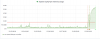
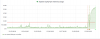
O orenk Basic Pleskian Dec 29, 2019 #1 Hi. I suppose one of the website hosted in my server has been hacked, or started a campaign without notification. or maybe it is DDOS attack ... ? How can I find which website causing this ? (attached is Apache graph from the past week) Attachments upload_2019-12-29_14-26-3.png 32.4 KB · Views: 9
Hi. I suppose one of the website hosted in my server has been hacked, or started a campaign without notification. or maybe it is DDOS attack ... ? How can I find which website causing this ? (attached is Apache graph from the past week)
Brujo Silver Pleskian Plesk Guru Dec 29, 2019 #2 you can try the plesk panel > Tools & Settings > Process list See also How to check which domain PHP process consumes CPU resources? Last edited: Dec 29, 2019
you can try the plesk panel > Tools & Settings > Process list See also How to check which domain PHP process consumes CPU resources?