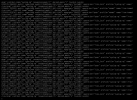
Compi Basic Pleskian Dec 31, 2023 #1 Server operating system version Debian 12.4 Plesk version and microupdate number Plesk Obsidian 18.0.57 Update #5 Hello, this is what my VNC console looks like: From my understanding, this isn't really bad but it annoys me. Is there a way to get rid of this?
Hello, this is what my VNC console looks like: From my understanding, this isn't really bad but it annoys me. Is there a way to get rid of this?
M Maarten Golden Pleskian Plesk Guru Dec 31, 2023 #2 Try this on the command line: Code: # dmesg -n 1 or # dmesg -n alert That should stop the warnings.
Compi Basic Pleskian Feb 1, 2024 #3 Hello, thanks for the head up. This worked until a reboot, is there are more permanent solution?
M Maarten Golden Pleskian Plesk Guru Feb 2, 2024 #4 To make this change permanent, modify your /etc/sysctl.conf file to include the following setting (the first 3 is the important part): Code: kernel.printk = 3 4 1 3 Description of kernel.printk values Between Debian 5 and 6, the default suggested value for kernel.printk in /etc/sysctl.conf was changed from kernel.printk = 4 4 1 7 to kernel.printk = 3 4 1 3. I understand that the first value unix.stackexchange.com
To make this change permanent, modify your /etc/sysctl.conf file to include the following setting (the first 3 is the important part): Code: kernel.printk = 3 4 1 3 Description of kernel.printk values Between Debian 5 and 6, the default suggested value for kernel.printk in /etc/sysctl.conf was changed from kernel.printk = 4 4 1 7 to kernel.printk = 3 4 1 3. I understand that the first value unix.stackexchange.com