
 Facebook
 Twitter
Hello sorry for my bad english.
I have a question to ask:
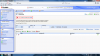
A few months ago I purchased a vps server with manageable Control Panel "Plesk" & "Power Panel", I tried to check from the control panel on the task but there is none. At this point, if I go to "Power Panel" -> Maintenance, I see that there is a backup (full) but if I select it and go to "Renew Backup" -> Backup Start -> or advanced backup scheduling, please go to the Management -> Scheduler -> New task wizard -> I wrote out that there is already a task. See attached. Is possible to remove all tasks? So you do not have to restart the VPS Server automatically?
Thx All
I have a question to ask:
A few months ago I purchased a vps server with manageable Control Panel "Plesk" & "Power Panel", I tried to check from the control panel on the task but there is none. At this point, if I go to "Power Panel" -> Maintenance, I see that there is a backup (full) but if I select it and go to "Renew Backup" -> Backup Start -> or advanced backup scheduling, please go to the Management -> Scheduler -> New task wizard -> I wrote out that there is already a task. See attached. Is possible to remove all tasks? So you do not have to restart the VPS Server automatically?
Thx All

