
 Facebook
 Twitter
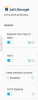
Hi, when I was setting up SSL for an account, I noticed the "Automatically replaces expired" option under Websites & Domains -> SSL/TLS Certificate is disabled and can't be enabled.
So I assume when the cert expires, it won't renew automatically. How to enable this option?
So I assume when the cert expires, it won't renew automatically. How to enable this option?


