• Halloween is coming! To celebrate the occasion, we dusted off a couple of old skins, and even created a brand new one (Pixel).
    To get into the festive spirit, install the Skins extension.
  • The new Python extension is now available. It allows customers to deploy and manage WSGI-based Python applications on their websites directly from Plesk.
  • The Plesk Mobile apps for iOS and Android and the Plesk Mobile Center extension have been deprecated, and are no longer available for new installations. In Plesk Obsidian 18.0.84, the Plesk Mobile Center extension will be removed from servers during the upgrade, and the Plesk Mobile apps will lose their server management features.
  • The Social Login extension has been deprecated and will be removed in Plesk Obsidian 18.0.84. After that, it will no longer be possible to log in to Plesk with a Google, Facebook, GitHub account, or with a passkey. Plesk usernames and passwords, as well as logging in with a WebPros Account, are not affected.

Question Backup and Restore During Server Changes

Baby Community

New Pleskian
Plesk Question.png

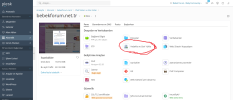
I would always back up the site files and site database during hosting server changes. I would place these backups on the other Plesk installed server I set up. It is possible to take a backup from the section I marked in the picture above and directly transfer the Baby Community to another server.
I tried it this way once. At that moment, the new version of Plesk was published. The latest version was on the Plesk installed server I just installed. When I tried to install the backup, I received an old version warning and I could not install the backup. Again, I placed the old-school files and database separately. Why doesn't restoring directly from the backup partition work in case of version differences?
 
Plesk backups are encrypted with the Plesk encryption key, which is unique for each Plesk installation. Plesk backups cannot be restored on another Plesk server without the option Upload backup files without a valid signature:

This article explains how to restore the backup when you get that warning:
 
Back
Top