
 Facebook
 Twitter
Luke Gilliver
New Pleskian
Within Plesk 12.5.30 (MU#10) there is a bug that stops the responsive header menu from being opened.
Page Affected: <plesk control panel domain>/plesk/server/mail/
Accessed via: Control Panel > Tools & Settings > Mail Server Settings
The tabs
When clicking on the menu, nothing happens.
The script at this point for the menu item "Settings" reads:
No Javascript error is thrown.
A similar menu is in use within the Domain sections which works.
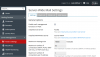
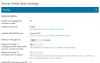
Page Affected: <plesk control panel domain>/plesk/server/mail/
Accessed via: Control Panel > Tools & Settings > Mail Server Settings
The tabs
on small screen devices (or small viewing windows) <767px become a solid blue dropdown navigational menu.Settings | Black List | White List | Mail Queue
When clicking on the menu, nothing happens.
The script at this point for the menu item "Settings" reads:
HTML:
<a href="/server/mail.php3?serviceNodeId=1" onclick="if(this.up('li').id == 'current') { this.up('#tabs').toggleClassName('responsive-tabs-visible'); return false; };lon();"><span>Settings</span></a>No Javascript error is thrown.
A similar menu is in use within the Domain sections which works.


