• The APS Catalog has been deprecated and removed from all Plesk Obsidian versions.
    Applications already installed from the APS Catalog will continue working. However, Plesk will no longer provide support for APS applications.
  • Please be aware: with the Plesk Obsidian 18.0.78 release, the support for the ngx_pagespeed.so module will be deprecated and removed from the sw-nginx package.

Resolved Cannot restore Acronis Backup (Cannot access the backup)

Daan Verbaan

New Pleskian
Server operating system version
Ubuntu 24.04
Plesk version and microupdate number
Plesk Obsidian 18.0.72 Update #3 Web Host Edition
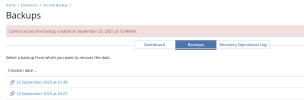
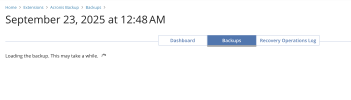
Hi, I have Plesk server (Obsidian) with the Acronis Plugin installed. Backup procedure runs fine and backups are visible in the Acronis Dashboard as well. However restoring a backup from the Plesk Interface isn't working. Not even close, I'm not able to load te back up and get the details. After a very long time with a spinner 'Loading the backup. This may take a while.
ajax-loader.gif
' , I get the error: 'Cannot access the backup created at September 23, 2025 at 12:48 AM.', that's it.

Can anyone help me out how to solve this problem?

Thanks, Daan
 

Attachments

  • Screenshot 2025-09-23 at 09.14.18.png
    Screenshot 2025-09-23 at 09.14.18.png
    84.9 KB · Views: 2
  • Screenshot 2025-09-23 at 09.24.41.png
    Screenshot 2025-09-23 at 09.24.41.png
    113.6 KB · Views: 2
Check:
/usr/local/psa/var/modules/acronis-backup/srv/log/main.log
/var/log/plesk/panel.log
for errors related to it

If you see errors like:
{"status": "failed", "fail_reason": "timeout_exceeded"}
or
Unable to mount recovery point

You might need to increase the default timeout for Acronis:
/usr/local/psa/var/modules/acronis-backup/srv/config.ini
Code:
[app]...mounting_timeout = 3600...
Default is/was 60 so try 3600, and the same in
/usr/lib/Acronis/system_libs/config
Code:
export ACRONIS_MOUNT_DAEMON_TIMEOUT=3600

Then restart the services and retry
Code:
service acronis_mms restart
service acronis_plugin restart
 
Back
Top