
 Facebook
 Twitter
technicienRB
New Pleskian
- Server operating system version
- centOS 7.9.2009
- Plesk version and microupdate number
- 18.0.21
Hello,
reading this forum, i discovered that the mirrors repo from OVH to update aren't available anymore.
I'm using Plesk obsidian V18.0.21, and i need the last update to install let's encrypt extension on my server.
As i've read here : Changing the Updates/Upgrades Source,
i tried to change my repo. But i just can't :
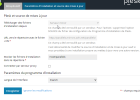
Does anybody have a solution for me ? Thanks
reading this forum, i discovered that the mirrors repo from OVH to update aren't available anymore.
I'm using Plesk obsidian V18.0.21, and i need the last update to install let's encrypt extension on my server.
As i've read here : Changing the Updates/Upgrades Source,
i tried to change my repo. But i just can't :
Does anybody have a solution for me ? Thanks


