
 Facebook
 Twitter
Hello, i want to connect with my database in Microsoft SQL Server. I use default install on plesk Microsoft SQL Server:

And upload here my database
I. Next i check settings:
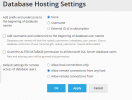
II. I check settings in Sql Server Configuration Manager and set port to 1433
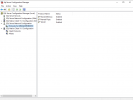
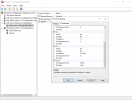
III. In the end i add rule in Firewall
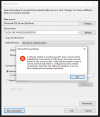
Now i try connect with database in Visual Studio. But I am not sure if I am using a good database server. I use <serwer_ip_adress>\MSSQLSERVER2019. Example if my server adres would be 1.1.1.1 i use 1.1.1.1\MSSQLSERVER2019. But when i try connect with database Server using this data i got error
And upload here my database
I. Next i check settings:
II. I check settings in Sql Server Configuration Manager and set port to 1433
III. In the end i add rule in Firewall
Now i try connect with database in Visual Studio. But I am not sure if I am using a good database server. I use <serwer_ip_adress>\MSSQLSERVER2019. Example if my server adres would be 1.1.1.1 i use 1.1.1.1\MSSQLSERVER2019. But when i try connect with database Server using this data i got error


