
 Facebook
 Twitter
Hi All,
I try to install php-fpm support for nginx from "Tools & Settings" > "Updates and Upgrades" (summary.html) > "Add/Remove Components" (add_components.html) and check the php-fpm support nginx like this :
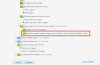
Then i press continue, it give me installation failed :
Installation started in background
Error: You already have the latest version of product(s) and all selected components
installed. Installation will not continue.
Then i remember i haven't add atomi / remi repo, so i try to add with this command :
wget http://dl.fedoraproject.org/pub/epel/5/x86_64/epel-release-5-4.noarch.rpm
wget http://rpms.famillecollet.com/enterprise/remi-release-5.rpm
rpm -Uvh remi-release-5*.rpm epel-release-5*.rpm
and i have enable the remi repo, then i try again from the above menu :
"Tools & Settings" > "Updates and Upgrades" (summary.html) > "Add/Remove Components" (add_components.html)
when i check the components, the next step is back to the same page but different URL, now it is (select_components.html).
In that page there are 3 buttons, "back", "continue" and "cancel installation", because i want to install, i press continue but it back return to the "Add/Remove Components" (select_components.html)
I've tried googling it, but i don't get a clue, could someone help me with this?
Thank you
I try to install php-fpm support for nginx from "Tools & Settings" > "Updates and Upgrades" (summary.html) > "Add/Remove Components" (add_components.html) and check the php-fpm support nginx like this :
Then i press continue, it give me installation failed :
Installation started in background
Error: You already have the latest version of product(s) and all selected components
installed. Installation will not continue.
Then i remember i haven't add atomi / remi repo, so i try to add with this command :
wget http://dl.fedoraproject.org/pub/epel/5/x86_64/epel-release-5-4.noarch.rpm
wget http://rpms.famillecollet.com/enterprise/remi-release-5.rpm
rpm -Uvh remi-release-5*.rpm epel-release-5*.rpm
and i have enable the remi repo, then i try again from the above menu :
"Tools & Settings" > "Updates and Upgrades" (summary.html) > "Add/Remove Components" (add_components.html)
when i check the components, the next step is back to the same page but different URL, now it is (select_components.html).
In that page there are 3 buttons, "back", "continue" and "cancel installation", because i want to install, i press continue but it back return to the "Add/Remove Components" (select_components.html)
I've tried googling it, but i don't get a clue, could someone help me with this?
Thank you


