Facebook
 Twitter
goodomen
New Pleskian
Hello my problem is this:
I can login at my plesk, so that means my credentials are ok.
But when i go to
https://MYSERVER:8443/repair/
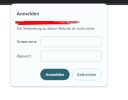
The window asking my credentials pops up, I input the same credentials as the ones I use in plesk.
Then it thinks for a second and asks the credential again.
No error or something else.
I used all browsers to check if it is a browser thing.
I can login at my plesk, so that means my credentials are ok.
But when i go to
https://MYSERVER:8443/repair/
The window asking my credentials pops up, I input the same credentials as the ones I use in plesk.
Then it thinks for a second and asks the credential again.
No error or something else.
I used all browsers to check if it is a browser thing.