• The new Python extension is now available. It allows customers to deploy and manage WSGI-based Python applications on their websites directly from Plesk.
  • The Plesk Mobile apps for iOS and Android and the Plesk Mobile Center extension have been deprecated, and are no longer available for new installations. In Plesk Obsidian 18.0.84, the Plesk Mobile Center extension will be removed from servers during the upgrade, and the Plesk Mobile apps will lose their server management features.
  • The Social Login extension has been deprecated and will be removed in Plesk Obsidian 18.0.84. After that, it will no longer be possible to log in to Plesk with a Google, Facebook, GitHub account, or with a passkey. Plesk usernames and passwords, as well as logging in with a WebPros Account, are not affected.

Can't start Tomcat Java

Jonasv

New Pleskian
Hello

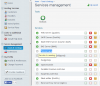
I run a server with Plesk 11.0.9 and want to add Tomcat support. I installed the "Tomcat Java Servlets support", but can't start the service in the "Services management" tool. It does not show any button. How do I do the next step to run tomcat in plesk?

Thank you for your help
Jonas
 
I can't reproduce it. I have installed "Tomcat Java Servlets support" component, went to "Services management" and saw "Tomcat Java" button.
Have you tried to click "Refresh" button there?
 
Yes, I did refresh and also did a restart of the server. I noticed that the mouseover of the status icon shows "Service is running". How is it possible to remove or reinstall the service?

Thanks.

Screenshot 2014-06-03 15.05.02.png
 
Back
Top