
 Facebook
 Twitter
- Server operating system version
- Ubuntu 20.04.6 LTS
- Plesk version and microupdate number
- Plesk Obsidian 18.0.66 Update #2
Hi, I'm trying to connect my company calendar (Plesk Premium Email) to my own personal calendar (Google Calendar).
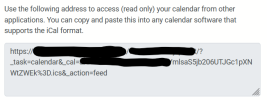
Plesk Premium Email has the option to share a "iCal read only URL" (screenshot below), and that's nice - but I discovered that the iCal url generated by PPE is protected: if I don't use it directly in the same browser I used to log in in the webmail, the iCal can't be accessed. So I can't add it to Google Calendar, or use it in any other way that is different from simply downloading the Ics.
It's not even a simple basic-auth: it uses session, so i can't use any of the "https://user@pass:webmail.domain" variants.
It seems wrong. I mean, the iCal link should be usable with no auth, or at least it should be POSSIBLE to do it (an option?) otherwise how would it be different from the export button?
I also managed to track down (what should be) the code handling this: https://git.kolab.org/diffusion/RPK/browse/master/plugins/calendar/calendar.php$1953 . It looks like this behaviour is intended, but I really can't understand the reasoning.
Please help me to understand. How should I use that iCal link? Thanks!
Plesk Premium Email has the option to share a "iCal read only URL" (screenshot below), and that's nice - but I discovered that the iCal url generated by PPE is protected: if I don't use it directly in the same browser I used to log in in the webmail, the iCal can't be accessed. So I can't add it to Google Calendar, or use it in any other way that is different from simply downloading the Ics.
It's not even a simple basic-auth: it uses session, so i can't use any of the "https://user@pass:webmail.domain" variants.
It seems wrong. I mean, the iCal link should be usable with no auth, or at least it should be POSSIBLE to do it (an option?) otherwise how would it be different from the export button?
I also managed to track down (what should be) the code handling this: https://git.kolab.org/diffusion/RPK/browse/master/plugins/calendar/calendar.php$1953 . It looks like this behaviour is intended, but I really can't understand the reasoning.
Please help me to understand. How should I use that iCal link? Thanks!
