Facebook
 Twitter
Changing my e-mail address on the Plesk Forums does not work.
How to reproduce:
1. Go to Account > Contact Details
2. Change e-mail address, and enter password,
3. Press 'Save Changes'.
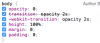
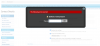
An error message in Russian appears, saying "Требуется авторизация" (Authorization required) and a field labeled with "Пароль" (Password). Unfortunately, the overlay causes the body element to have opacity of 0, so the error message quickly disappears, showing a white page.
When removing the opacity from the body, the form shows again. After entering my password and pressing OK, the page reloads, but my email address is still the same and is not changed.
How can I change my e-mail address?
Please assist. Thank you!
How to reproduce:
1. Go to Account > Contact Details
2. Change e-mail address, and enter password,
3. Press 'Save Changes'.
An error message in Russian appears, saying "Требуется авторизация" (Authorization required) and a field labeled with "Пароль" (Password). Unfortunately, the overlay causes the body element to have opacity of 0, so the error message quickly disappears, showing a white page.
When removing the opacity from the body, the form shows again. After entering my password and pressing OK, the page reloads, but my email address is still the same and is not changed.
How can I change my e-mail address?
Please assist. Thank you!