• The APS Catalog has been deprecated and removed from all Plesk Obsidian versions.
    Applications already installed from the APS Catalog will continue working. However, Plesk will no longer provide support for APS applications.
  • Please be aware: with the Plesk Obsidian 18.0.78 release, the support for the ngx_pagespeed.so module will be deprecated and removed from the sw-nginx package.

Issue Cloudflare - Logs showing Cloudflare IPs, not client IP

Thx for reply. but we already apply article, cron job working for update, but nothing. still all logs show cloudflare IP's.
 
Hi, @hunterwolf . Could you please confirm which logs exactly are you referring to - domain logs or panel access logs? The IP addresses in the domain name logs should properly reflect the IP addresses after applying the changes in the article. However, that won't apply to panel access logs.
 
Hi, @hunterwolf . Could you please confirm which logs exactly are you referring to - domain logs or panel access logs? The IP addresses in the domain name logs should properly reflect the IP addresses after applying the changes in the article. However, that won't apply to panel access logs.

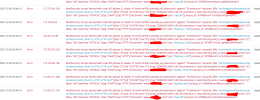
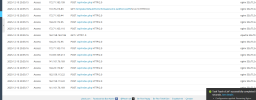
Thx for reply. I'm talking about domain access and error logs. You can see it in the picture, all cloudflare IP's.
 

Attachments

  • plesk.png
    plesk.png
    202.5 KB · Views: 9
  • plesk2.png
    plesk2.png
    89.2 KB · Views: 7
Hi,
I have found the solution. After applying the fix above, I forgot to remove the IPs from Additional nginx directives.
I removed them and now I have visitor IPs in my logs.
In end of the fix it says "Note: The script could be called at the required intervals using Plesk Scheduled Tasks." How often should the script be called?
 
Hi,
I have found the solution. After applying the fix above, I forgot to remove the IPs from Additional nginx directives.
I removed them and now I have visitor IPs in my logs.
In end of the fix it says "Note: The script could be called at the required intervals using Plesk Scheduled Tasks." How often should the script be called?

Hi,

I think cron running once a day would be enough.

But the solution still doesn't work for me. Still logs save with cloudflare proxy ip.
I don't understand which IP address you removed. Which Additional nginx directives are you referring to?
 
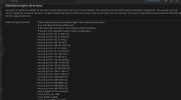
I had issue with some bots crowling my server for several days and failtoban was banning the cloudflare IPs. Then I found this article. At the begining didnt work for me, because my configuration was like this
Screenshot 2026-03-31 173236.png
Screenshot 2026-03-31 173306.png

Then I removed the IPs from additional nginx directive and everything worked as expected.
Now in accses logs I see real IPs and failtoban bans them as expected.
 
I see. You had previously added the Cloudflare IP addresses in directive box.

I don't understand why the solution isn't working for me. I followed the article exactly, but it's still the same.
 
I think I've found where the mistake is.

The file /etc/nginx/conf.d/cloudflare.conf was empty. i execute script file "cf.sh" 2-3 times, still empty.
i remove cloudflare.conf.
When I ran the cf.sh again, it was added correctly.
 
@hunterwolf,

I tried the following:
I can confirm it is working as expected on my side, so I’m not sure why /etc/nginx/conf.d/cloudflare.conf is ending up empty.

From the server, when you run:

#curl -LO https://raw.githubusercontent.com/plesk/kb-scripts/master/cf-nginx-ip-passthrough/cf.sh && chmod 700 /root/cf.sh

and then test these commands:

#curl -sSL https://www.cloudflare.com/ips-v4

#curl -sSL https://www.cloudflare.com/ips-v6

do you see the list of Cloudflare IPs returned?
 
Back
Top