
 Facebook
 Twitter
Falko_Braune
New Pleskian
I'm using plesk with CentOS 6.6
After setting up some e-mail accounts over the plesk gui I tried to connect via a mail software (like thunderbird).
This failed with every combination of settings I tried.
So I checked if the POP3/IMAP services are running correctly using telnet.
I connected using the following command:
The response was:
Did I miss to enable a setting?
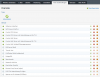
The Plesk gui schows me, that the corresponding services are running:
Is there a solution?
After setting up some e-mail accounts over the plesk gui I tried to connect via a mail software (like thunderbird).
This failed with every combination of settings I tried.
So I checked if the POP3/IMAP services are running correctly using telnet.
I connected using the following command:
Code:
telnet <host-ip> 110The response was:
Code:
Trying <host-IP>...
Connected to <host-IP>.
Escape character is '^]'.
-ERR Cannot connect to POP server <host-IP> (<host-IP>:110), NB connect error 1460
Connection closed by foreign host.
Did I miss to enable a setting?
The Plesk gui schows me, that the corresponding services are running:
Is there a solution?


