• Debian 11 is approaching its end-of-life (vendor EOL date - August 31, 2026). Plesk Obsidian 18.0.80 will be the last release to support it.
    If you are running Plesk Obsidian on Debian 11, we recommend you upgrade those servers to Debian 12 using our dist-upgrade tool.
  • We plan to deprecate and remove the support for XML RPC protocol versions earlier than 1.6.9.1 in Plesk Obsidian 18.0.82. We strongly recommend that you update all existing integrations using earlier versions of the XML RPC protocol to comply with the version 1.6.9.1 specification.

Question Create a Jails Fail2ban for SSH with a different port.

WhiteTiger

Basic Pleskian
Server operating system version
Ubuntu 22.04.1 LTS
Plesk version and microupdate number
18.0.50
Access via SSH has been configured with a different port than 22.
How can I create a Fail2ban Jail to monitor it?
Can I copy the one for SSH and edit it?
 
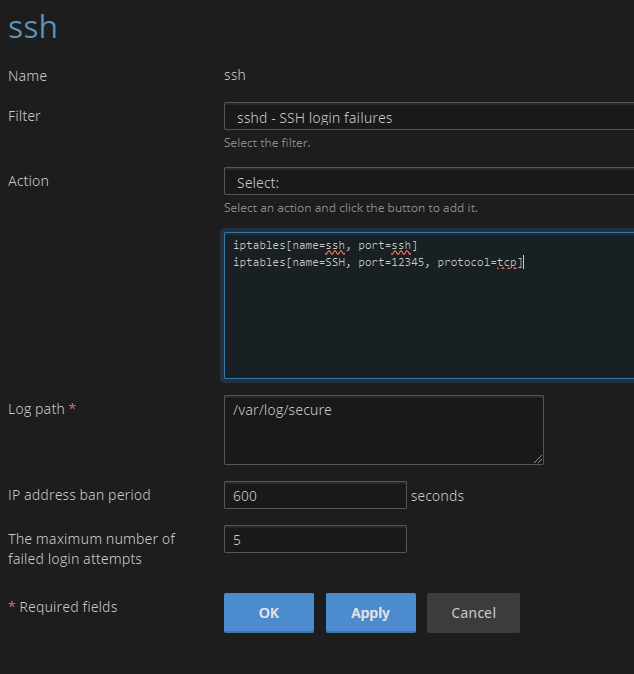
EDIT: fail2ban monitors the log entries in /var/log/secure for failed SSH connectings, no matter which port is used for SSH. However you'll need to adjust the action for the SSH jail to actually block incoming traffic on your custom SSH port.

In Plesk go to Tools & Settings > IP Address Banning (Fail2Ban). Click the Jails tab, then click the SSH link from the list. Click the Change settings button, and change the port number defined for the action. Like example below.
Code:
action = iptables[name=SSH, port=12345, protocol=tcp]
 
Last edited:
Check if you have a /etc/fail2ban/jail.local and if there is a [ssh] section.
Add an extra line where you define the new port:

[ssh]
enabled = true
port = 999

Restart fail2ban after you've changed the file and check the /var/log/fail2ban.log if it works.
 
The Jail for SSH port 22 I would like to keep in case I need to use this port (which is currently closed by the firewall).
 
In that case change the action of the existing SSH jail to something like:
Code:
action = iptables-multiport[name="ssh", port="22,1234"]
(replace the 1234 to the actual custom port number you're using).
 
You can just edit the current ssh jail to add:

Code:
iptables[name=SSH, port=12345, protocol=tcp]

raw
 
Back
Top