• Debian 11 is approaching its end-of-life (vendor EOL date - August 31, 2026). Plesk Obsidian 18.0.80 will be the last release to support it.
    If you are running Plesk Obsidian on Debian 11, we recommend you upgrade those servers to Debian 12 using our dist-upgrade tool.
  • We plan to deprecate and remove the support for XML RPC protocol versions earlier than 1.6.9.1 in Plesk Obsidian 18.0.82. We strongly recommend that you update all existing integrations using earlier versions of the XML RPC protocol to comply with the version 1.6.9.1 specification.

Issue Cronjob failed

Individuum92

New Pleskian
Server operating system version
Ubuntu 20.04.5 LTS
Plesk version and microupdate number
Plesk Obsidian 18.0.46
I need to schedule a php script with the task manager.

Following configuration:
Script path: /httpdocs/<path-to-vHost/script.php - without arguments.

When I execute the job I get an
Code:
Could not open input file: /httpdocs/<path-to-vHost/script.php
I already checked the permissions and give 775. No effect.
Crontab Shell: /bin/bash (but I think it doesn't matter because of I need to schedule a .php, not a shell script ...)

I've googled but can't find a working solution for my case. Any idea?
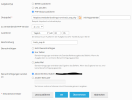
 
Try executing it as a PHP script and remove the first '/'
Don't change the permissions; that won't work.
 
Can you post a screenshot of the cronjob?

What is "<path-to-vHost" in this case? Where exactly is this script located?
 
The path either needs to be relative to the account (if this is configured inside a subscription) or it needs to be a fully qualified path starting from the partition's root (if this is configured as an administrator).

The comment field gives "track_exp.sh", so if your file cannot be found, check if it is really track_exp.php as configured or rather track_exp.sh as in the comment field.
 
The path is correct. The name delta was my mistake; It's the .php file which needs to be executed.

Am I right when I say that the error message "Could not open input file" is not the same as "No such file"? For my understanding that means, that the .php file is finding but the permissions are not correct? Maybe it's a wrong plesk configuration?
 
I've added a test.sh file right next to the php file, which I need to execute.
Same permissions and same path. When I run the .sh script via "command execute" in Plesk, it works fine.
When I try to execute the php script via "execute PHP Script" in Plesk, I get the error message. So it seems like that it isn't a path / permission issue.
 
Back
Top