Facebook
 Twitter
User name: Peter Debik
TITLE
Custom buttons in wrong display location
PRODUCT, VERSION, OPERATING SYSTEM, ARCHITECTURE
Obisidian, latest MU
PROBLEM DESCRIPTION
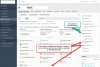
Custom buttons which are configured to be displayed on "Websites and Domains" are no longer displayed in the icon list on each domain, but in the right-hand menu bar.
STEPS TO REPRODUCE
Create custom buttons. For one, use "common access", for another "websites & domains" tab.
ACTUAL RESULT
All buttons are placed into the right-hand side.
EXPECTED RESULT
The buttons that are specific to the Websites & Domains tab should go into the icon grid of the domain.
ANY ADDITIONAL INFORMATION
YOUR EXPECTATIONS FROM PLESK SERVICE TEAM
Confirm bug
TITLE
Custom buttons in wrong display location
PRODUCT, VERSION, OPERATING SYSTEM, ARCHITECTURE
Obisidian, latest MU
PROBLEM DESCRIPTION
Custom buttons which are configured to be displayed on "Websites and Domains" are no longer displayed in the icon list on each domain, but in the right-hand menu bar.
STEPS TO REPRODUCE
Create custom buttons. For one, use "common access", for another "websites & domains" tab.
ACTUAL RESULT
All buttons are placed into the right-hand side.
EXPECTED RESULT
The buttons that are specific to the Websites & Domains tab should go into the icon grid of the domain.
ANY ADDITIONAL INFORMATION
YOUR EXPECTATIONS FROM PLESK SERVICE TEAM
Confirm bug