
 Facebook
 Twitter

Mark Bailey
Basic Pleskian
I'm sick of customer-facing upsells. For example, one of our clients logged into his WordPress site after not doing it for a while (since a webmaster handled everything). He asked about the WordPress Toolkit > Vulnerabilities menu alerting him that he was unprotected. The links to "Get Protected" (or however it's worded) are direct sales links to WebPros.
Despite the growing price of Plesk, all too often I find things like this...reminiscent of the "Get a web developer" links that pointed to Codeable without any prior warning or prior ability to turn them off (until people complained).
Quit double-dipping and trying to get money directly from our clients. There are other control panels out there (besides your sister panel, the abominable cPanel). You're making those look VERY attractive.
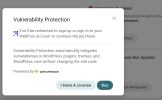
Despite the growing price of Plesk, all too often I find things like this...reminiscent of the "Get a web developer" links that pointed to Codeable without any prior warning or prior ability to turn them off (until people complained).
Quit double-dipping and trying to get money directly from our clients. There are other control panels out there (besides your sister panel, the abominable cPanel). You're making those look VERY attractive.


